Case Study - Simplifying Xcode Build Output
xcbeautify is a command-line tool that improves the developer experience by formatting xcodebuild commands as clean, readable, and structured output.
- Project
- xcbeautify
- Year
- Service
- Open Source Development, CI/CD Tooling, Command Line Utility

- GitHub Stars
- 1.3K+
- GitHub Forks
- 90+
- CI/CD Platforms Supported
- 4
- Community Contributors
- 60+
Overview
xcbeautify is a dedicated command-line utility that acts as a "beautifier" for Xcode's build process logs. It was created to address the longstanding challenge faced by iOS/macOS developers and CI/CD engineers: the massive, unstructured output generated by xcodebuild. By converting these logs into a concise, color-coded summary, xcbeautify significantly improves the debugging experience and the clarity of continuous integration pipelines.
The Problem
The core issue that xcbeautify set out to solve was the poor readability and fragile parsing of standard xcodebuild output:
- Noise and Volume: Raw
xcodebuildoutput is notorious for being extremely detailed and verbose, often obscuring critical warnings, errors, and test results within thousands of lines of log data. - CI/CD Inefficiency: While tools existed to clean up this output (most notably the Ruby-based
xcpretty), they often introduced their own issues, such as slow performance and reliance on a complex dependency chain (Ruby) that had to be managed across various development and CI environments. - New System Compatibility: As Xcode evolved, especially with the introduction of new build systems and parallel testing features, older beautification tools struggled to reliably parse and format the new log structures.
The Solution
xcbeautify provided a robust, modern solution by being written entirely in Swift. This decision yielded several key benefits that differentiate it from previous efforts:
Performance and Dependencies
By being written in Swift, xcbeautify compiles to a static binary. This eliminates the need for managing platform-specific dependencies like Ruby and its gems, making the tool faster to install, easier to deploy across different environments (including macOS and Linux), and more efficient in execution. It functions as a simple filter via a pipe:
set -o pipefail && xcodebuild [flags] | xcbeautifyEnhanced Readability and Features
The tool transforms the dense build log into a clean, hierarchical summary, using colors to instantly draw attention to important events:
- Colored, Human-Friendly Output: Clearly highlights actions (e.g.,
Compile Swift Source), warnings (Yellow), and errors (Red). - Parallel Testing Support: Reliably parses output generated when running tests on multiple simulators or devices concurrently, a feature often poorly handled by older tools.
- Swift Package Manager (SPM) Formatting: Extends its beautification to logs generated by
swift testand other SPM commands.
Deep CI/CD Integration
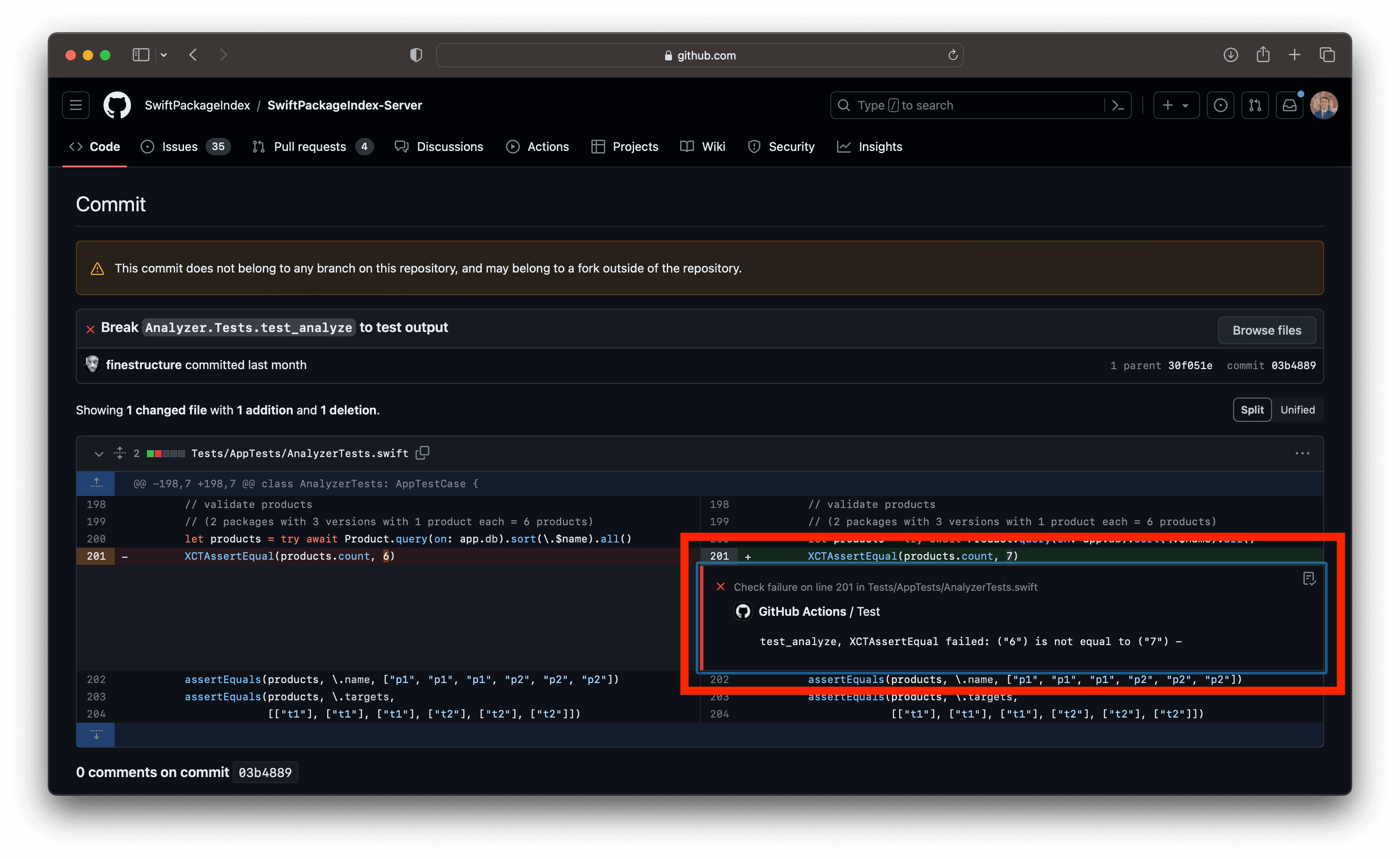
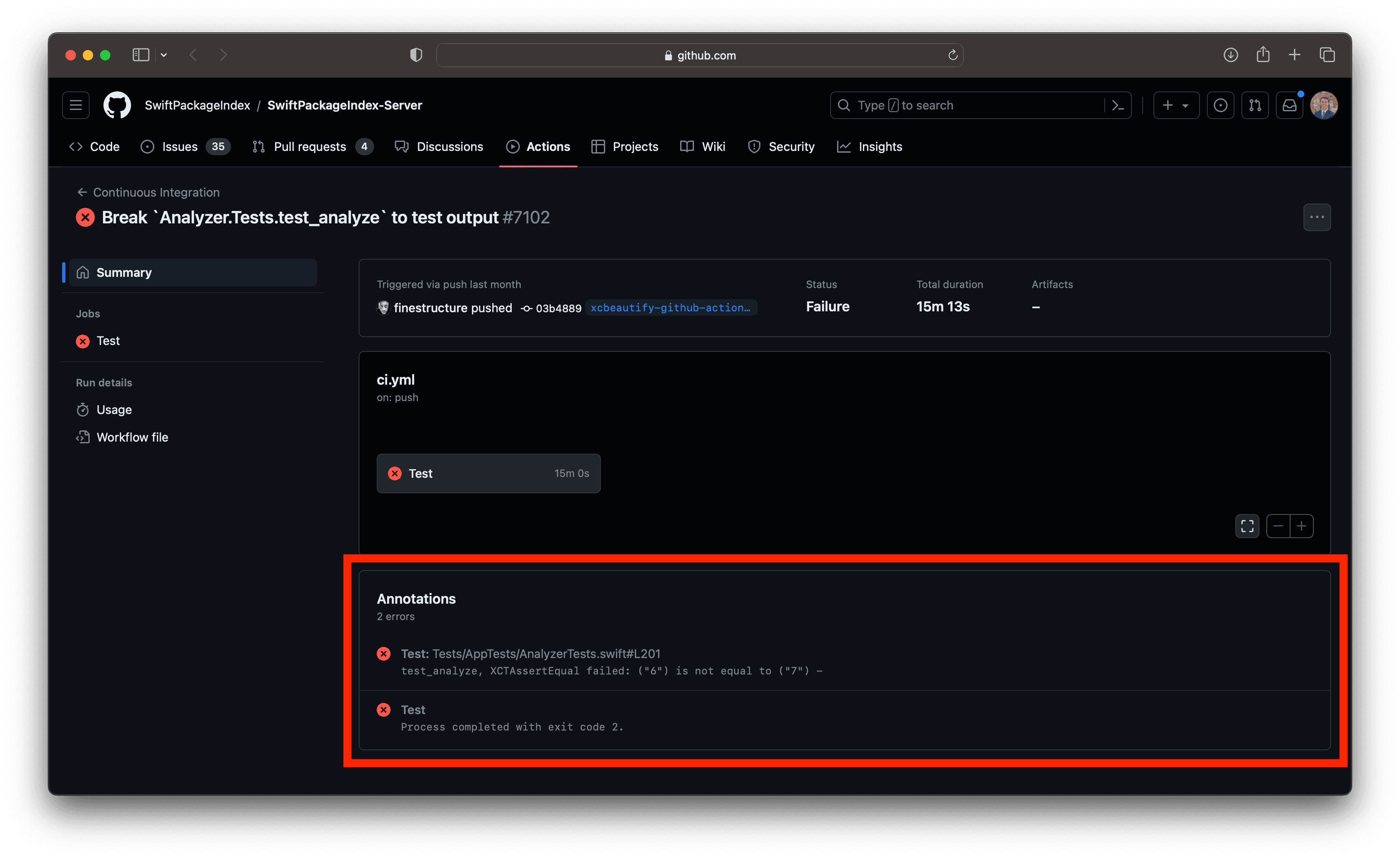
Recognizing that build log formatting is essential for Continuous Integration, xcbeautify includes specialized renderers that communicate directly with CI system UIs:
| CI/CD Platform | Renderer Functionality |
|---|---|
| GitHub Actions | Uses workflow commands to display warnings and errors as annotations directly in the PR or workflow run summary. |
| TeamCity | Leverages service messages to integrate build results, warnings, and errors into the TeamCity interface. |
| Azure DevOps Pipeline | Uses specific logging commands to provide structured feedback within the pipeline logs. |
This capability allows CI dashboards to immediately flag issues without requiring users to scroll through raw logs.
Shipped with GitHub
GitHub now pre-installs xcbeautify on all macOS runners for GitHub Actions, making it available out-of-the-box to every developer building iOS and macOS applications on the platform. This integration by one of the world's largest developer platforms validates xcbeautify as essential infrastructure, powering millions of builds for organizations ranging from indie developers to Fortune 500 companies.
Reporting
xcbeautify can generate JUnit reports, a standard XML format for testing results. This is critical for integrating test outcomes into various CI/CD dashboards and quality gates for automated decision-making.
Technical Excellence
As primary maintainer, I've built xcbeautify with production-grade reliability:
- Robust parsing architecture handling diverse Xcode output formats
- Professional CI/CD practices and automated dependency management
- Enterprise-level reliability meeting GitHub's infrastructure standards
- Active community stewardship with ongoing improvements
- xcbeautify continues to evolve alongside Xcode and the Apple development platform, ensuring developers always have the tools they need for an optimal build experience.
Impact
xcbeautify has successfully established itself as a preferred tool for managing Xcode build output, driven by its superior performance and modern feature set.
- Increased Development Velocity: Developers can quickly scan the output for relevant information, reducing time spent diagnosing build failures or test issues.
- Reduced CI/CD Overhead: By eliminating external language dependencies (like Ruby) and offering native static binaries, maintenance of build scripts is simplified and execution time is reduced.
- Wider Compatibility: Its support for the newest Xcode build systems, parallel testing, and platforms like Linux makes it highly versatile for modern Swift development workflows, including server-side Swift.
- Community Validation: The high star count and active development indicate its central role in the modern Apple development ecosystem, serving as a high-performance replacement for previous generation log parsers.
- Swift Development
- CLI Tooling
- Regex Parsing
CI/CD Integrations (GitHub Actions, Azure, TeamCity)